Apex is a programming language in Salesforce.com which is similar to Java programming with object oriented concepts.Apex enables developer to add business logic to system events like visualforce pages,button clicks and update of records.
Apex supports:-
- Triggers which are similar to database system triggers.
- Database statements that provide query language in salesforce like SOQL and SOSL.
- Rollbacks and transactions.
- give Global access modifier.
- versioning of custom code.
We can write apex code directly in Salesforce user interface.Open the Developer Console under Your Name or the quick access menu You can also write Apex code on client by using Force.com IDE plugin for Eclipse.
Apex Classes
Steps for creating Apex class:-
- Open Developer console Under your name or Quick access menu.
- In the Developer console click File>New>Apex class and enter class name myfirstclass then click ok
- Enter this code
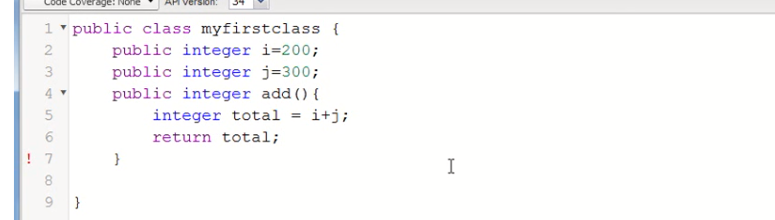
- Click Ctrl+S to save your class
Now we use anonymous Apex execution for invoke Apex.Its allows you to run lines of code for test out functionality.
- In the Developer Console, click Debug >Open Execute Anonymous Window.
- In that window enter following code.
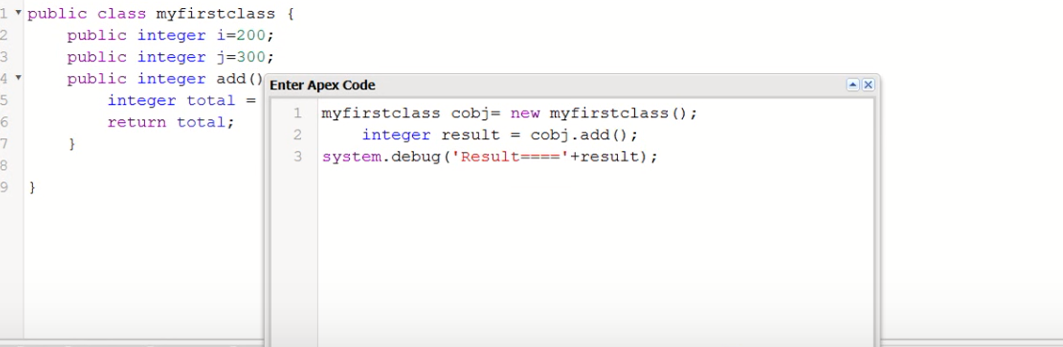
3. Now click on Execute.
this method has executed now you get total number of i and j.
 Salesforce basic to advance